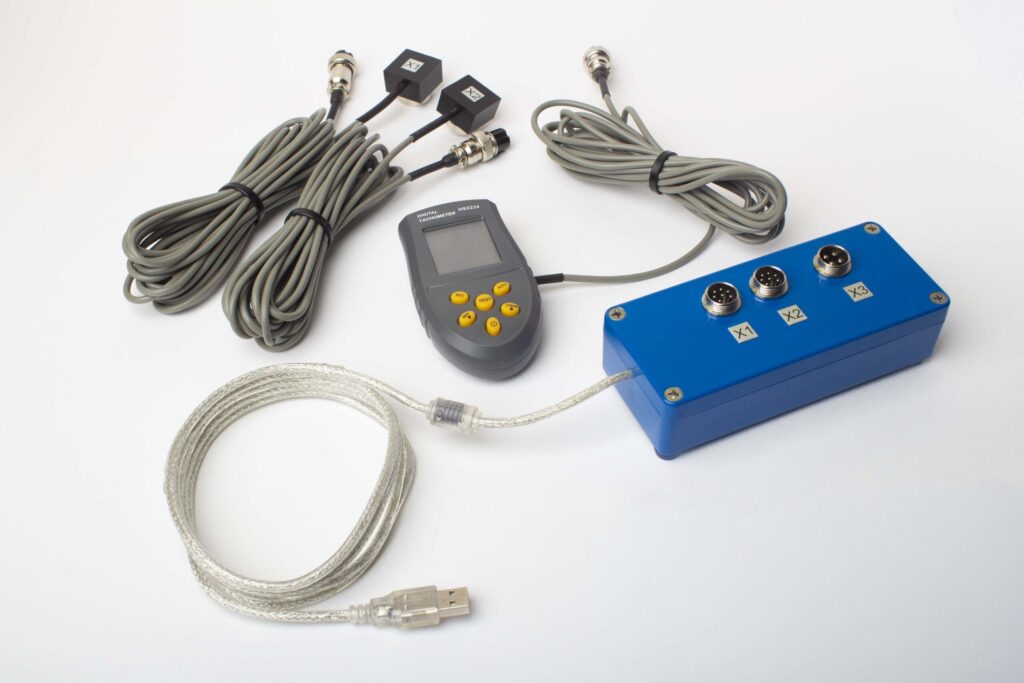
Everything a field engineer needs to balance rotors on-site — from the physics of unbalance to the final verification run. Seven-step procedure, trial weight formulas, correction angle measurement, and ISO tolerance tables. Tested on 2,000+ rotors across fans, mulchers, crushers, and shafts.
What Is Dynamic Balancing?
Definition: Dynamic balancing is the process of measuring and correcting the uneven mass distribution of a rotating body (rotor) while it spins at operating speed. Unlike static balancing, which corrects mass offset in a single plane, dynamic balancing addresses imbalance in two or more planes simultaneously, eliminating both centrifugal force and rocking couple that cause bearing vibration.
Every rotating part — from a 200 kg mulcher rotor to a 5 g dental drill spindle — has some residual unbalance. Manufacturing tolerances, material inconsistencies, corrosion, and accumulated deposits shift the mass centre away from the geometric rotation axis. The result is a centrifugal force that grows with the square of speed: double the RPM and the force quadruples.
A rotor spinning at 3,000 RPM with just 10 g of unbalance at a 150 mm radius generates roughly 150 N of rotating force — enough to destroy bearings in weeks. Dynamic balancing reduces this force to a level specified by international standards (ISO 21940-11, formerly ISO 1940), extending bearing life from months to years and cutting vibration-related downtime.
Field engineer’s note: In 13 years of field work, unbalance has been the root cause in roughly 40% of the vibration complaints I investigate. It is also the easiest fault to fix on-site — a trained technician with the right instrument finishes in 30–45 minutes without removing the rotor.
Static vs Dynamic Balance
Static Balance (single plane)
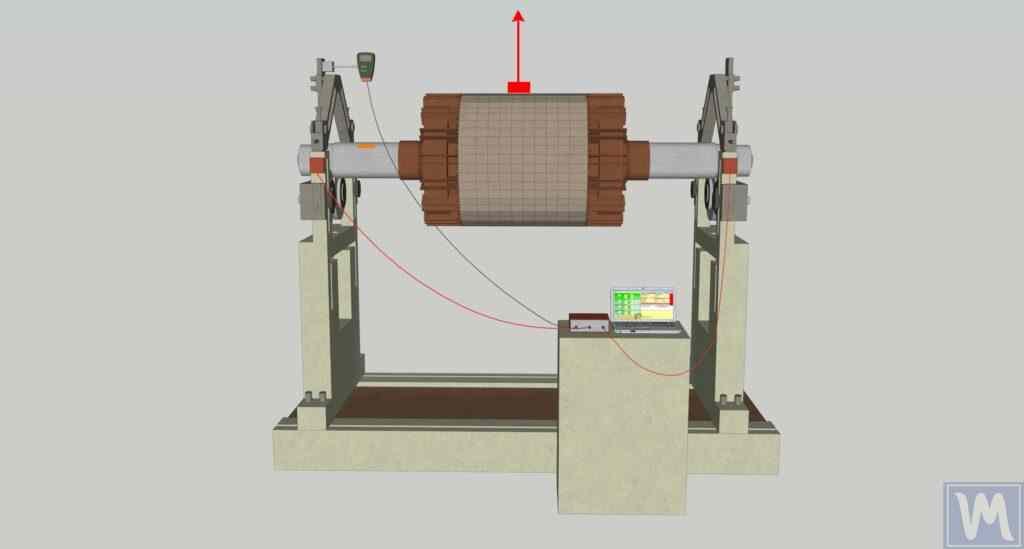
The rotor’s centre of gravity is offset from the rotation axis in one plane. When placed on knife-edge supports, the heavy side rolls to the bottom — you can detect this without spinning.
Correction: add or remove mass at a single angular position opposite the heavy spot. One correction plane is enough.
Applies to: narrow disc-shaped parts where diameter > 7× width — flywheels, grinding wheels, single-disc impellers, saw blades, brake discs.
Dynamic Balance (two planes)
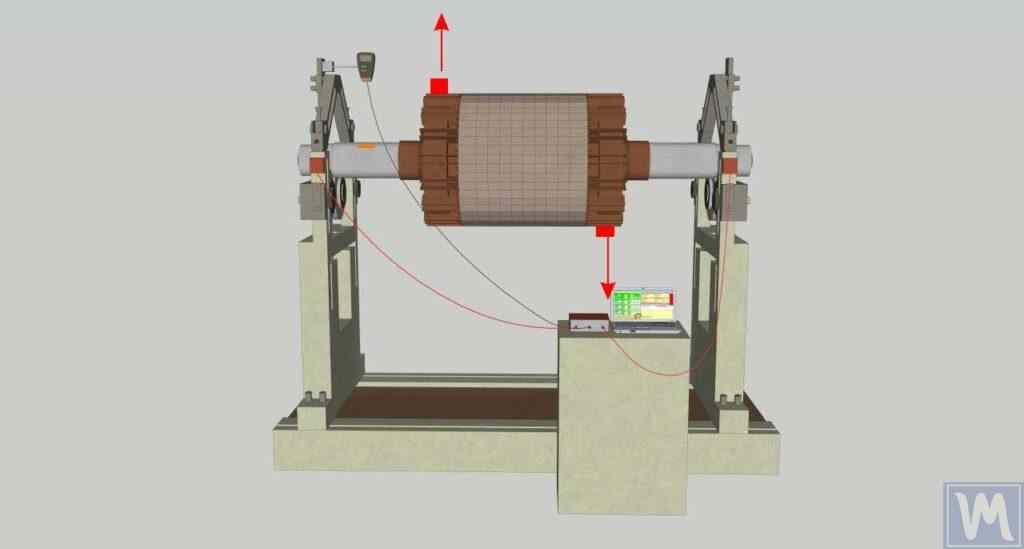
Two (or more) mass offsets sit in different planes along the rotor length. They may cancel each other statically — the rotor sits still on knife-edges — but create a rocking couple when spinning. This couple cannot be detected or corrected without rotation.
Correction: two compensating weights in two separate planes. The instrument calculates mass and angle for each plane from the influence coefficient matrix.
Applies to: elongated rotors — shafts, fans with wide impellers, mulcher rotors, rollers, multi-stage pump impellers, turbines.
Key distinction: a statically balanced rotor can still have severe dynamic imbalance. The forces in one plane exactly oppose those in another, so the rotor does not roll on supports — but the moment it spins, the couple creates violent vibration at the bearings. Two-plane dynamic balancing catches what static methods miss.
Four Types of Unbalance
ISO 21940-11 distinguishes four fundamental unbalance patterns. Understanding which one dominates helps choose the correct balancing strategy.
| Type | Description |
|---|---|
| Static | Single heavy spot. CG displaced parallel to rotation axis. Detectable at rest. Single-plane correction. |
| Couple | Two equal masses 180° apart in different planes. Net force = 0, but creates a torque (couple). Invisible at rest. |
| Quasi-static | Combination of static + couple where principal inertia axis intersects rotation axis at a point other than the CG. |
| Dynamic | General case: principal inertia axis neither intersects nor parallels rotation axis. The most common real-world pattern. Two-plane correction mandatory. |
In practice, almost every rotor you encounter in the field has dynamic unbalance — a combination of force and couple components. That is why two-plane balancing is the default procedure for any rotor that is not a thin disc.
When to Use Single-Plane vs Two-Plane Balancing
The deciding factor is the rotor’s geometry ratio L/D (axial length to outer diameter) combined with its operating speed.
| Criterion | Single-Plane (1 sensor) | Two-Plane (2 sensors) |
|---|---|---|
| L/D ratio | L/D < 0.14 (diameter > 7× width) | L/D ≥ 0.14 |
| Typical parts | Grinding wheel, flywheel, single-disc impeller, pulley, brake disc, saw blade | Fan rotor, mulcher, shaft, roller, multi-stage pump, turbine, crusher |
| Unbalance types corrected | Static only (force) | Static + couple + dynamic (force + moment) |
| Correction planes | 1 | 2 |
| Measurement runs | 2 (initial + 1 trial) | 3 (initial + 2 trials, one per plane) |
| Time on site | 15–20 min | 30–45 min |
Rule of thumb: If the correction planes are separated by less than ⅓ of the rotor’s bearing span, cross-coupling between planes is small and single-plane balancing may work even for L/D > 0.14. But if you have a two-channel instrument, always use two planes — it takes only 10 extra minutes and catches couple unbalance that single-plane misses.
ISO 21940-11 Balance Quality Grades
ISO 21940-11 (the successor to ISO 1940-1) assigns each class of rotating machinery a balance quality grade G, defined as the maximum permissible velocity of the rotor’s centre of gravity in mm/s. The permissible residual specific unbalance eper (in g·mm/kg) is derived from the grade and the operating speed:
e_per = G × 1000 / ω = G × 1000 / (2π × RPM / 60)
- e_per — permissible residual specific unbalance, g·mm/kg
- G — balance quality grade (e.g. 6.3 means 6.3 mm/s)
- ω — angular velocity, rad/s
- RPM — operating speed, rev/min
| Grade | e·ω, mm/s | Machine types |
|---|---|---|
G 0.4 |
0.4 | Gyroscopes, spindles of precision grinding machines |
G 1.0 |
1.0 | Turbochargers, gas turbines, small electric armatures with special requirements |
G 2.5 |
2.5 | Electric motors, generators, medium/large turbines, pumps with special requirements |
G 6.3 |
6.3 | Fans, pumps, process machinery, flywheels, centrifuges, general industrial machinery |
G 16 |
16 | Agricultural machinery, crushers, drive shafts (cardan), parts of crushing machines |
G 40 |
40 | Passenger car wheels, crankshaft assemblies (series production) |
G 100 |
100 | Crankshaft assemblies of large slow marine diesel engines |
Worked Example: Fan Rotor
A centrifugal fan rotor weighs 80 kg, operates at 1,450 RPM, and the correction radius is 250 mm. Required grade: G 6.3.
e_per = 6.3 × 1000 / (2π × 1450 / 60) = 6300 / 151.8 ≈ 41.5 g·mm/kg
Total permissible unbalance = 41.5 × 80 = 3,320 g·mm. At correction radius 250 mm: max residual mass = 3320 / 250 = 13.3 g per plane. That means each correction plane may retain no more than 13.3 g of unbalance — roughly the weight of three M6 washers.
Related standards: ISO 21940-11 and other ISO standards (rigid and flexible rotors), vibration severity limits (ISO 10816-3).
Seven-Step Field Balancing Procedure
This is the influence coefficient method for two-plane field balancing, applied with a portable instrument such as the Balanset-1A. The same logic works with any two-channel balancing analyser.
Step 1: Prepare the Rotor & Mount Sensors
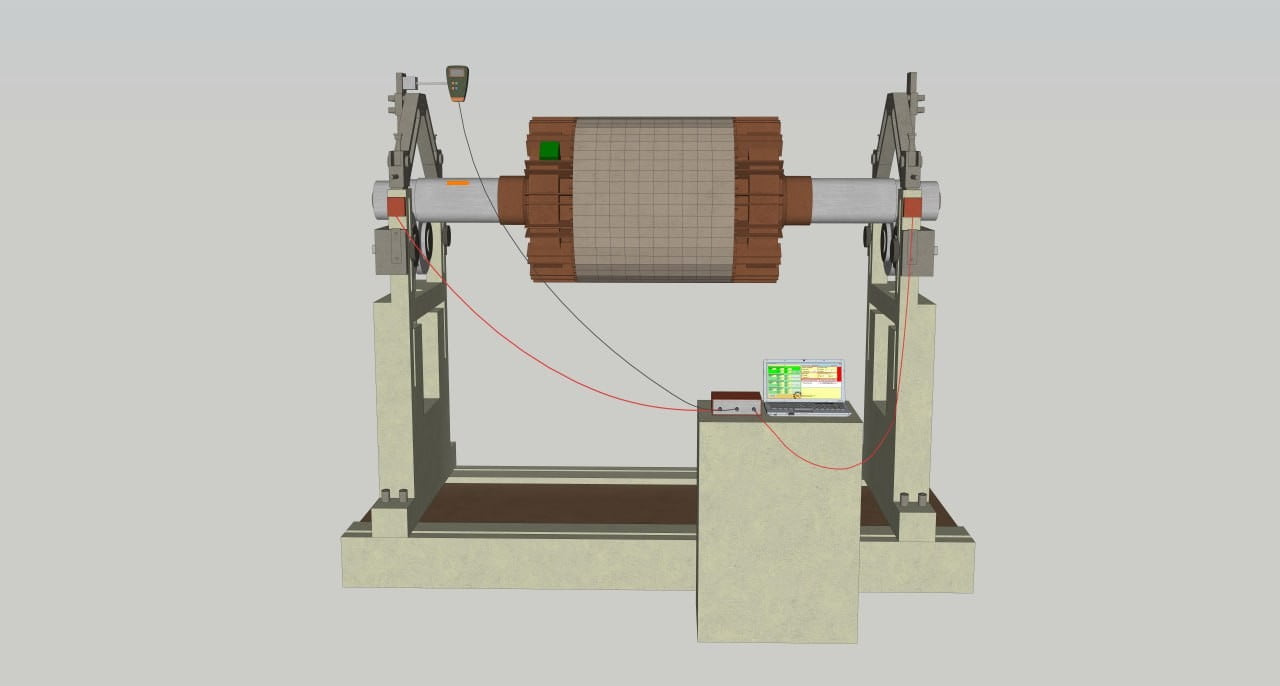
Clean bearing housings from dirt and grease — sensors must sit flush on the metal surface. Mount vibration sensor 1 on the bearing housing closest to Plane 1 (usually the drive end). Mount sensor 2 near Plane 2 (non-drive end). Attach reflective tape to the shaft for the laser tachometer. Connect all cables to the measuring unit.
Step 2: Measure Initial Vibration (Run 0)
Start the rotor and bring it to stable operating speed. The instrument measures vibration amplitude (mm/s) and phase angle (°) at both sensors simultaneously. This is the baseline — the "sickness" of the rotor before treatment. Record the values and stop the machine.
Field tip: Wait at least 10–15 seconds after the RPM stabilises before recording. Thermal transients and air currents settle out in the first few seconds.
Step 3: Install Trial Weight in Plane 1 (Run 1)
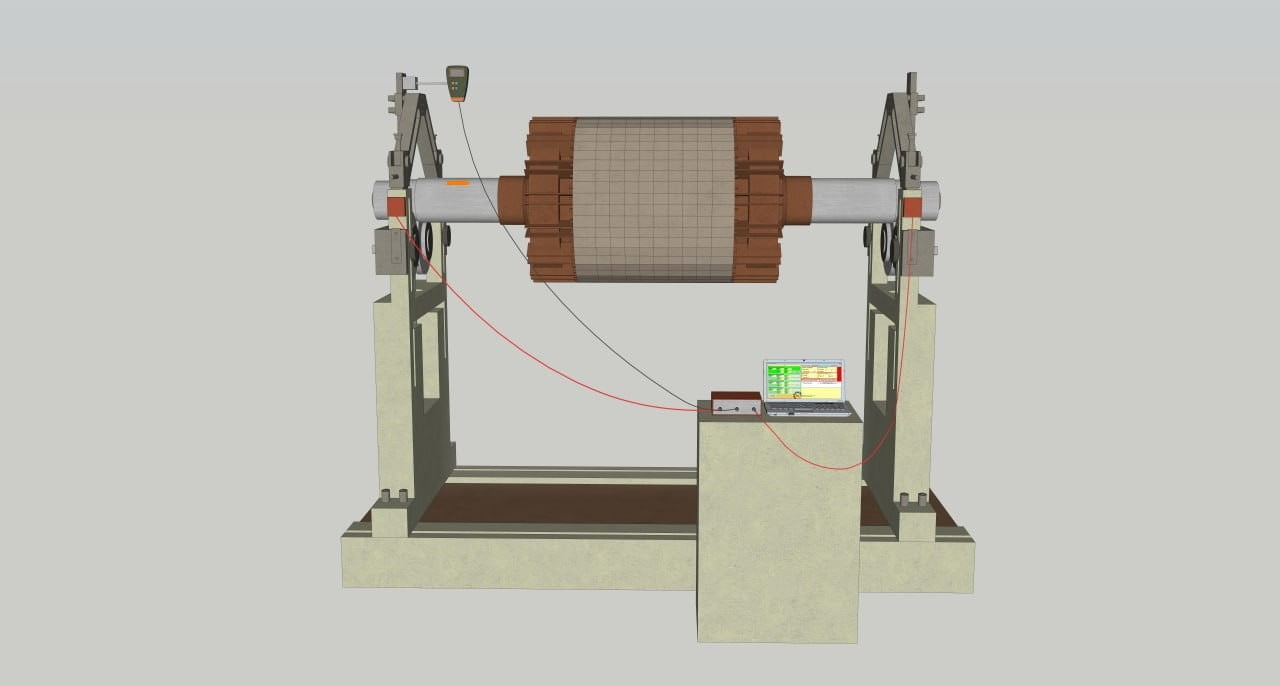
Stop the rotor. Attach a trial weight of known mass at an arbitrary angular position in Plane 1. Mark this position clearly — it becomes your 0° reference for angle measurement later. Restart the rotor and record vibration at both sensors. The instrument now knows how the rotor’s vibration field changes when mass is added in Plane 1.
Field tip: Use a bolt with a washer clamped to the rotor rim, or a hose clamp with a nut for quick attachment. The trial weight should produce a measurable vibration change (≥30% amplitude change or ≥30° phase shift at either sensor).
How much should the trial weight weigh? Use the empirical formula
M_t = M_r × K / (R_t × (N/100)²)where Mr = rotor mass (g), K = support stiffness coefficient (1–5, use 3 for average), Rt = installation radius (cm), N = RPM. See the Trial Weight Calculation section below for worked examples.
Step 4: Move Trial Weight to Plane 2 (Run 2)
Stop the rotor. Remove the trial weight from Plane 1. Attach the same trial weight (or one of similar known mass) at an arbitrary position in Plane 2. Mark this second reference point. Restart and record vibration at both sensors. Now the instrument has the complete influence coefficient matrix — four complex coefficients linking unbalance in either plane to vibration at either sensor.
Field tip: If you use a different trial weight mass in Plane 2, enter the correct value in the software — the maths adjusts automatically.

Step 5: Calculate Correction Weights
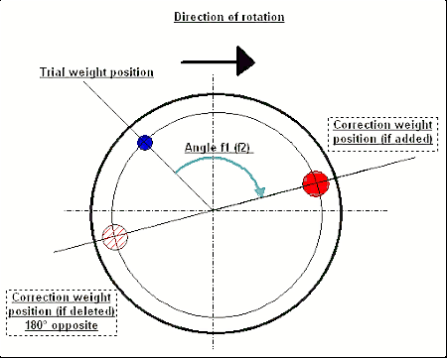
The instrument solves the influence coefficient equations and displays: mass (g) and angle (°) for Plane 1, and mass (g) and angle (°) for Plane 2. The angle is measured from the trial weight position in the direction of rotor rotation. If the software indicates "remove," it means the correction weight should go 180° opposite the indicated "add" position.
Step 6: Install Correction Weights
Remove the trial weight from Plane 2. Fabricate or select correction weights matching the calculated masses. Measure the angle from the trial weight reference mark in the direction of rotation. Attach the correction weights firmly — welding, hose clamps, set-screw weights, or bolts depending on the machine type and speed.
Field tip: If you cannot place a weight at the exact angle (e.g. only bolt holes available), use the weight-splitting function — the instrument decomposes the correction vector into two components at the nearest available positions.
Step 7: Verify Balance (Check Run)
Restart the rotor and record the final vibration. Compare against the initial baseline and against the ISO 21940-11 tolerance for your machine class. If vibration is within specification, you are done. If not, the instrument can perform a trim run — it uses the existing influence coefficients to calculate a small additional correction without new trial weights.
Field tip: One trim run is usually enough. If you need more than two trims, something has changed between runs — check for loose weights, thermal growth, or speed variation.
Trial Weight Calculation
The trial weight must be heavy enough to produce a noticeable vibration change, but light enough not to overload bearings or create a dangerous condition. The standard empirical formula accounts for rotor mass, correction radius, operating speed, and support stiffness:
M_t = M_r × K / (R_t × (N / 100)²)
- M_t — trial weight mass, grams
- M_r — rotor mass, grams
- K — support stiffness coefficient (1 = soft mounts, 3 = average, 5 = rigid foundation)
- R_t — trial weight installation radius, cm
- N — operating speed, RPM
Worked Examples (K = 3, average stiffness)
| Machine | Rotor mass | RPM | Radius | Trial weight (K = 3) |
|---|---|---|---|---|
| Mulcher rotor | 120 kg | 2,200 | 30 cm | 360,000 / (30 × 484) ≈ 25 g |
| Industrial fan | 80 kg | 1,450 | 40 cm | 240,000 / (40 × 210.25) ≈ 29 g |
| Centrifuge drum | 45 kg | 3,000 | 15 cm | 135,000 / (15 × 900) = 10 g |
| Crusher shaft | 250 kg | 900 | 25 cm | 750,000 / (25 × 81) ≈ 370 g |
Practical tip — verify the response: The formula gives the minimum trial mass that should produce a measurable response. After the trial run, check that the phase shifted by at least 20–30° and the amplitude changed by 20–30%. If the response is too small, double or triple the trial mass and repeat. At very low RPM (< 500), the formula may yield impractically large values — in that case, use 10% of rotor weight divided by the correction radius as a starting point.
Correction Angle Measurement
The balancing instrument outputs two numbers per plane: mass (how much weight) and angle (where to place it). The angle is always referenced to the trial weight position.
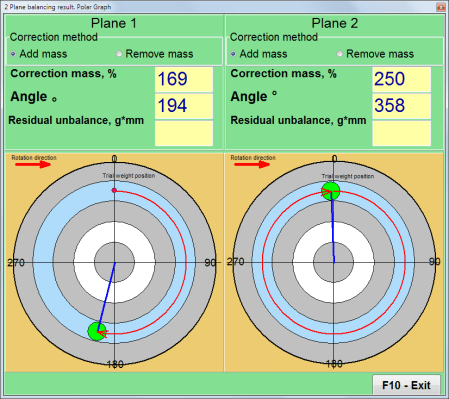
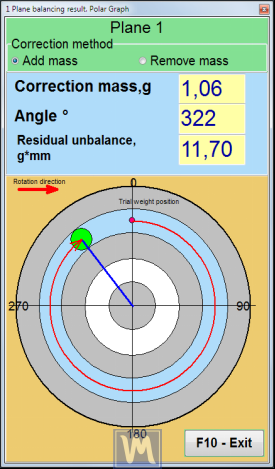
Balanset-1A result screen: the software calculates correction mass and angle for each plane and displays vectors on a polar chart. Red vectors show the required correction; green shows residual vibration after trim run.
How to Measure the Angle
- Reference point (0°): the angular position where you placed the trial weight. Mark it clearly on the rotor before the trial run.
- Measurement direction: always in the direction of rotor rotation.
- Reading the angle: the instrument displays angle f₁ for Plane 1 and f₂ for Plane 2. From the trial weight mark, count that many degrees in the rotation direction — that is where the correction weight goes.
- If removing mass: place the correction at 180° opposite the indicated "add" position.
Weight Splitting to Fixed Positions

When the rotor has pre-drilled holes or fixed mounting positions (e.g. fan blade bolts), you may not be able to place a weight at the exact calculated angle. The Balanset-1A includes a weight splitting function: you enter the angles of the two nearest available positions, and the software decomposes the single correction vector into two smaller weights at those positions. The combined effect matches the original vector.
Correction Planes & Sensor Placement
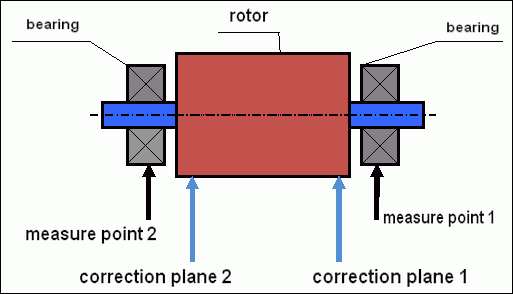
The correction plane is the axial position on the rotor where you add or remove mass. The sensor measures vibration at the nearest bearing. A few key rules:
- Sensor goes on the bearing housing — as close to the bearing centreline as possible, in the radial direction (horizontal preferred).
- Plane 1 corresponds to Sensor 1, Plane 2 to Sensor 2. Keep the numbering consistent or the software will swap correction planes.
- Maximise plane separation: the further apart the two correction planes, the better the couple resolution. Minimum practical separation is ⅓ of the bearing span.
- Choose accessible positions: the correction plane must be a location where you can physically attach weights — a flange edge, bolt circle, rim, or welding surface.

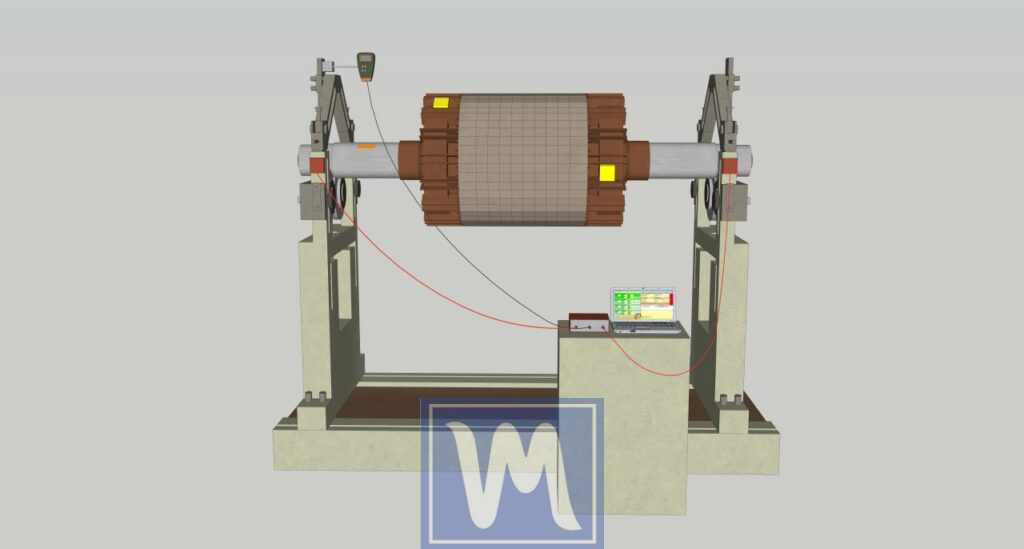
In the photo above, a mulcher rotor is prepared for two-plane balancing. Blue markers 1 and 2 indicate the sensor positions on bearing housings. Red markers 1 and 2 show the correction planes — in this case, the flanged ends of the rotor body where weights will be welded.
Cantilever (Overhung) Rotor
Cantilever rotors — fan impellers, flywheels mounted outboard of the bearing span, pump impellers — require a different sensor and plane layout. Both correction planes are on the same side of the bearings, and sensor placement must account for the overhung mass amplifying couple unbalance.

Sensor connection diagram for a cantilever rotor: both correction planes are outboard of the bearing span.
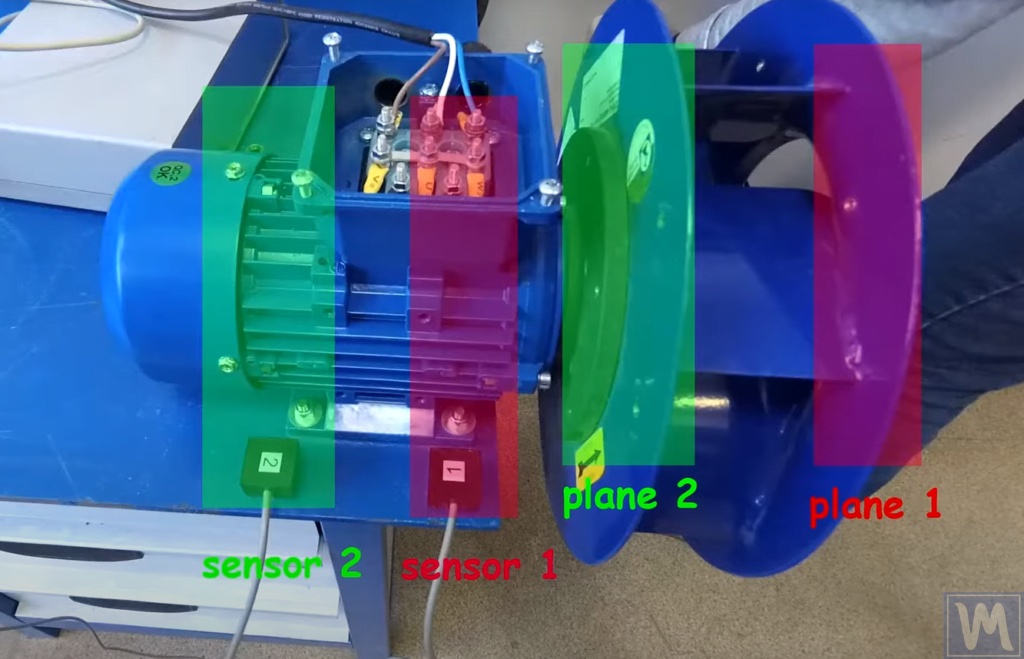
Field example: cantilever rotor with sensor and correction plane positions marked.
Applications by Machine Type
| Machine | Typical specs | Notes |
|---|---|---|
| Industrial fans & blowers | 600–3,600 RPM · G 6.3 · Two-plane | Most common field balancing task. Watch for dust buildup on blades — it shifts balance over time. Re-balance after cleaning or blade replacement. |
| Mulcher & flail mower rotors | 1,800–2,500 RPM · G 16 · Two-plane | Heavy rotors (80–200 kg) with replaceable flails. Unbalance appears after flail wear or replacement. Correct in two planes at the rotor end-flanges. Typical improvement: 12 → 1 mm/s. |
| Crushers & hammer mills | 600–1,200 RPM · G 16 · Two-plane | Extremely heavy rotors (200–1,000+ kg). Trial weights are large (5–15 kg bolts). Low RPM means large permissible unbalance — but impact loads and bearing cost still justify balancing. |
| Centrifuges | 1,000–10,000 RPM · G 2.5–6.3 · Two-plane | Basket or disc centrifuges in food, chemical, and pharma. High speed demands tight tolerance. Field balancing avoids lengthy disassembly. Check for product buildup inside drum. |
| Electric motors & generators | 750–3,600 RPM · G 2.5 · Two-plane | Motor armatures are factory balanced, but re-balancing is needed after winding repair, bearing replacement, or coupling changes. Test with coupling half attached for best results. |
| Combine harvester augers & rotors | 400–1,200 RPM · G 16 · Two-plane | Long augers and threshing rotors pick up soil and crop residue imbalance. Seasonal balancing before harvest prevents bearing failure in the field. Correction weights welded to flights. |
| Pump impellers | 1,450–3,600 RPM · G 6.3 · Single or two-plane | Overhung impellers often need only single-plane correction if narrow. For multi-stage pumps, each impeller is balanced individually on a mandrel before assembly. |
| Turbochargers | 30,000–300,000 RPM · G 1.0 · Two-plane | Ultra-high speed demands G 1.0 or tighter tolerance. Material removal by grinding — no welded weights at these speeds. Requires high-frequency vibration sensors. |
See also the dedicated guides for fans and mulchers.
Weight Attachment Methods
| Method | Attachment | Best for | Limits |
|---|---|---|---|
| Welding | Steel washers or plates tack-welded to rotor rim | Mulchers, crushers, heavy industrial rotors | Permanent. Cannot use on aluminium or stainless without special rod |
| Bolts & nuts | Bolts through pre-drilled holes with locknuts | Fan impellers, flywheels, coupling flanges | Requires existing holes or new drilling |
| Hose clamps | Stainless-steel hose clamp with weight sandwiched | Shafts, rollers, cylindrical rotors in the field | Temporary or semi-permanent. Verify clamp torque |
| Set-screw clip-on | Pre-made clip-on weights (like tyre weights) | Fan blades, thin rims, light rotors | Limited mass range. May slip at high RPM |
| Adhesive (epoxy) | Weight glued to surface | Precision rotors, clean environments | Requires clean dry surface. Temperature limit ~120°C |
| Material removal | Drilling or grinding material away from heavy side | Turbochargers, high-speed spindles, impellers | Permanent and precise but irreversible. Use when adding weight is not safe |
Common Mistakes in Field Balancing
| # | Mistake | Consequence | Fix |
|---|---|---|---|
| 1 | Sensor mounted on a guard or cover | Resonance of the cover distorts amplitude and phase readings → wrong correction | Always mount on the bearing housing metal surface |
| 2 | Trial weight too light | Phase and amplitude change is within noise → influence coefficients are unreliable | Ensure ≥30% amplitude change or ≥30° phase shift at at least one sensor |
| 3 | Speed variation between runs | Vibration at 1× changes with RPM² — even 5% speed change corrupts the data | Use a tachometer for precise RPM tracking. Wait for speed to stabilise |
| 4 | Forgetting to remove the trial weight | Correction calculation includes trial weight effect → result is meaningless | Follow a strict routine: remove trial weight before installing correction weights |
| 5 | Mixing up Plane 1 and Plane 2 | Correction weights go in the wrong planes → vibration increases | Label sensors and planes clearly. Sensor 1 → Plane 1, Sensor 2 → Plane 2 |
| 6 | Measuring angle opposite to rotation | Correction goes 360° − f instead of f → opposite side of rotor | Confirm rotation direction before starting. Always measure in rotation direction |
| 7 | Thermal growth during runs | Bearing clearance changes between cold start runs → drifting measurements | Either warm up to steady state before run 0, or complete all runs quickly (<5 min apart) |
| 8 | Using single-plane on a long rotor | Couple unbalance remains uncorrected → vibration may even increase at the far bearing | Use two-plane balancing for any rotor where L/D ≥ 0.14 or plane separation is significant |
Field Report: Mulcher Rotor Balancing
Flail Mulcher — Maschio Bisonte 280 (real field data, February 2025)
| Vibration before | Vibration after | Reduction | Time on site |
|---|---|---|---|
| 12.4 mm/s | 0.8 mm/s | 93.5% | 38 min |
Machine: Maschio Bisonte 280 flail mulcher, 165 kg rotor, 2,100 RPM PTO speed. Client reported severe vibration after replacing 8 flails.
Setup: Two accelerometers on bearing housings, laser tachometer on PTO shaft. Balanset-1A two-plane mode.
Run 0: Sensor 1 = 12.4 mm/s @ 47°, Sensor 2 = 8.9 mm/s @ 213°. ISO 10816-3 zone D (danger).
Trial runs: 500 g trial weight used in both planes. Clear response — amplitude change >60% at both sensors.
Correction: Plane 1: 340 g welded at 128°. Plane 2: 215 g welded at 276°.
Verification: Sensor 1 = 0.8 mm/s, Sensor 2 = 0.6 mm/s. ISO zone A (good). No trim run needed.
Two-Plane Dynamic Balancing of a Fan
Industrial fans — centrifugal, axial, and mixed-flow — are among the most common rotors balanced in the field. The procedure below walks through a real two-plane job on a radial fan using the Balanset-1A.
Determining Planes and Installing Sensors
Clean the surfaces for sensor installation from dirt and oil. Sensors must fit snugly to the metal surface of the bearing housing — never mount on covers, guards, or unsupported sheet-metal panels.
Sensor connection and correction plane layout for a cantilever-mounted fan impeller.
Sensor and correction plane positions on a fan rotor: Sensor 1 (red) near front, Sensor 2 (green) near rear.
- Sensor 1 (red): Install closer to the front of the fan (Plane 1 side).
- Sensor 2 (green): Install closer to the rear of the fan (Plane 2 side).
- Plane 1 (red zone): Correction plane on the impeller disc, closer to the front.
- Plane 2 (green zone): Correction plane closer to the back plate or hub.
Connect both vibration sensors and the laser tachometer to the Balanset-1A. Attach reflective tape to the shaft or hub for RPM reference.
Balancing Process
Start the fan and take initial vibration measurements (Run 0). Install a trial weight of known mass on Plane 1 at an arbitrary point, run the fan, and record the vibration change (Run 1). Move the trial weight to Plane 2 at an arbitrary point, run the fan again, and record (Run 2). The Balanset-1A software uses all three measurements to calculate the correction mass and angle for each plane.

Correction weights installed on the fan impeller at positions calculated by the Balanset-1A.
Angle Measurement for Fan Correction Weights
The angle is measured from the trial weight position in the direction of fan rotation — exactly as described in the Correction Angle Measurement section above. Mark where the trial weight was placed (0° reference), then count the indicated angle along the rotation direction to find the correction weight position.

Balanset-1A two-plane balancing result screen: correction mass and angle displayed for both planes.
Based on the angles and masses calculated by the software, install the correction weights on Plane 1 and Plane 2. Run the fan once more and verify that vibration has dropped to an acceptable level per ISO 21940-11 (typically G 6.3 for general-purpose fans). If residual vibration is still above target, perform one trim run.
Frequently Asked Questions
What is the difference between static and dynamic balancing?
Static balancing corrects unbalance in a single plane — the rotor’s centre of gravity is shifted back to the rotation axis. It works for narrow, disc-shaped parts where diameter is greater than 7 times the width. Dynamic balancing corrects unbalance in two planes simultaneously, addressing both force and couple unbalance. It is required for any elongated rotor where masses are distributed along the shaft length. A rotor can be statically balanced yet dynamically unbalanced — the couple component is invisible until the rotor spins.
How do I calculate the trial weight mass for field balancing?
Use the formula: Mt = Mr × K / (Rt × (N/100)²), where M is in grams, R in cm, and N in RPM. K is the support stiffness coefficient (1 = soft, 3 = average, 5 = rigid). The goal is to produce at least 20–30% amplitude change or 20–30° phase shift. At low speeds below 500 RPM, use the 10% static rule instead: trial mass = 10% of rotor mass / correction radius.
When should I use single-plane vs two-plane balancing?
Use single-plane for narrow disc-shaped rotors where diameter exceeds 7 times the axial width — flywheels, grinding wheels, saw blades. Use two-plane for anything longer: shafts, fan impellers, mulcher rotors, rollers, multi-stage pump assemblies. When in doubt, always choose two-plane — it catches couple unbalance that single-plane misses, and only adds one extra measurement run (about 10 minutes).
What ISO standard covers rotor balancing tolerances?
ISO 21940-11:2016 is the current standard for rigid rotors. It replaced ISO 1940-1:2003. It defines balance quality grades from G 0.4 (gyroscopes) to G 4000 (slow marine diesel crankshafts). Common grades: G 6.3 for fans and pumps, G 2.5 for electric motors, G 1.0 for turbocharger rotors, G 16 for agricultural machinery and crushers. The grade times the angular velocity gives the maximum permissible CG velocity in mm/s — from there you calculate the allowable residual mass at the correction radius.
How do I measure the angle for correction weight placement?
The instrument calculates the correction angle relative to the trial weight position. Mark where you placed the trial weight — this is your 0° reference. Then measure the indicated angle in the direction of rotor rotation from that reference point. The correction weight goes at the resulting position. If the instrument says to remove weight, place it 180° opposite. Use a protractor or divide the circumference into marked segments before starting.
Can I balance a rotor without removing it from the machine?
Yes — this is called field balancing or in-situ balancing. You mount vibration sensors on the bearing housings, attach a tachometer reference, and run the machine at operating speed. A portable instrument like the Balanset-1A guides you through the trial weight sequence and calculates corrections. Field balancing saves hours of disassembly time, eliminates alignment errors from reinstallation, and balances the rotor under real operating conditions — including the effect of coupling, thermal growth, and actual bearing stiffness.
Equipment for Field Balancing
The Balanset-1A is a two-channel portable instrument that handles single-plane and two-plane dynamic balancing, plus vibration analysis (overall velocity, spectra, waveform). It ships as a complete kit:
- 2× piezoelectric vibration sensors with magnetic mounts
- Laser tachometer (non-contact RPM sensor) with reflective tape
- USB measuring unit (connects to any Windows laptop)
- Software: balancing wizard, vibration meter, spectrum analyser
- Carrying case with all cables and accessories
RPM range: 300–100,000. Vibration range: 0.5–80 mm/s RMS. Phase accuracy: ±1°. Weight splitting, trim runs, tolerance checking, and report generation included in the software. Full kit weighs 3.5 kg.